

Admin Console
Metrics, dev tools, and paywall demos. How to open it, what each tab shows, and how to grant access.
A full-screen console at the /admin route. It serves two audiences: admins (real production data) and developers (debug tools).
Implementation
-
To open it, tap the version number twice in the Settings footer. In debug, the console also shows up as a direct link in Settings.
-
To grant someone admin access, set the
role = "admin"field in the database, never from the app:- Firebase: Firestore →
userscollection → the user's document → addrole = admin - Supabase: Table editor →
userstable →rolecolumn = admin - API: your server returns and protects the
rolefield
To find a user's ID: open the Admin console → Tools → Copy UID, or check the current session in Overview.
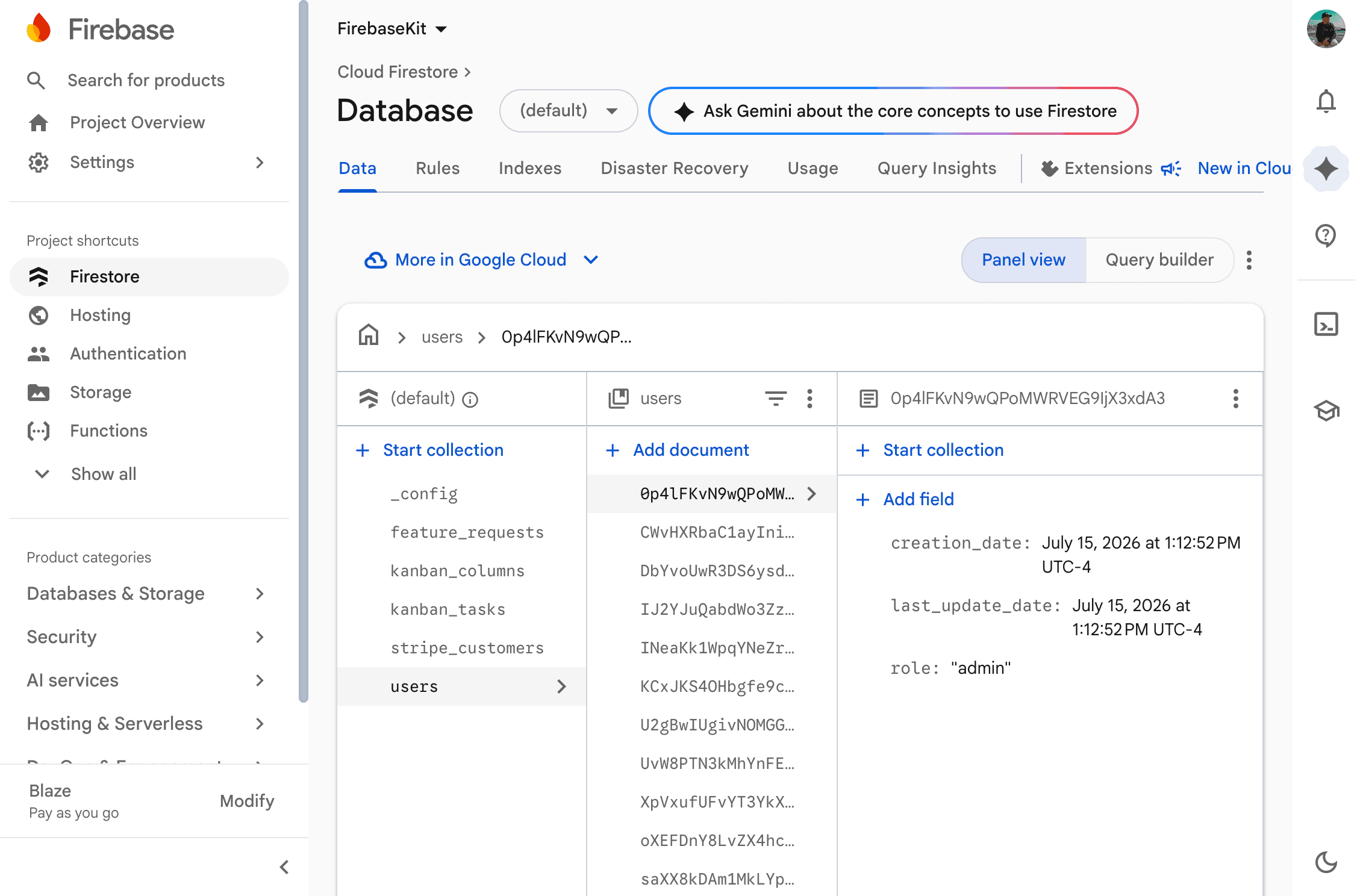
Firestore: user document with the role: 'admin' field added rolecan only be written from the server, never from the app. Any attempt by the client to changeroleis blocked across all three backends (Firestore rules / Supabase trigger / validation on your server). This is intentional: otherwise any user could make themselves an admin. - Firebase: Firestore →
Information
Who sees what
Access uses two independent gates:
Debug (kasy run) | Production (release build) | |
|---|---|---|
| Opening the console | Any dev | Admin only |
| Dev tools (Kit and Tools tabs) | Yes | Don't show up |
| Real user data | Admin only | Admin only |
| Paywall/ads demo | Admin (always test) | Admin |
Summary: debug opens the dev tools; the role field opens the production data.
Available tabs
| Tab | Content | Requires admin role? | Disappears in release? |
|---|---|---|---|
| Overview | Active backend, current session, request count | Partial | No |
| Users | Table with search, subscriber filter, pagination | Yes | No |
| Requests | User feature requests (moderate, edit text) | Yes | No |
| Kanban | The project's own task board (see Kanban), only shows up if the module is on | Yes | No |
| Kit | Feature demos and component gallery | No (dev) | Yes |
| Tools | Dev Inspector, paywalls, ads, send push, copy UID/FCM, test onboarding | No (dev) | Yes |
Remembers the last section (debug only)
In debug, the console reopens on the last tab you visited, so you don't have to navigate back to where you were working every time. In release, it always lands on Overview.
Also in debug, the "Admin" shortcut in Settings opens straight into the Kanban instead of Overview, so it doesn't fire the dashboard queries when all you want is the task board. To make debug behave like production here, set kDebugAdminOpensKanban to false in lib/core/navigation/admin_routes.dart.
How role is protected on each backend
The app's user.isAdmin (which compares role == "admin") only shows or hides UI. Every read of real data is validated again on the server:
| Backend | Blocking writes to role | How the admin reads users |
|---|---|---|
| Firebase | Firestore rules block any client write to the role field | The listUsers Cloud Function checks role == "admin" through the Admin SDK before returning data |
| Supabase | The enforce_role_immutable trigger stops anon and authenticated from writing role; only service_role and the dashboard get through | The admin-list-users Edge Function validates the caller's role from the JWT and only then uses service_role |
| REST API | Your server returns role and must reject any client attempt to write it | A GET /admin/users endpoint that validates role == "admin" and answers 403 otherwise |
Last updated on 08/23/2026