

App update
Notice about a new store version and a "What's new" bottom sheet after the user updates.
The kit has two distinct update flows. Don't mix them up:
| Flow | When it shows up | What it does |
|---|---|---|
| Update available | User is on an old version | "Update now" button opens the store |
| What's new | User just updated | Bottom sheet with the version's highlights |
Both are native-only (they don't appear on web) and work in PT, EN, and ES across all three backends. The config comes from Firebase Remote Config, which is initialized in every project, even Supabase and API ones.
Implementation
Update available
-
In Firebase Remote Config, create two text keys:
Key Effect app_latest_versionThe newest version in the store. If the user's version is lower → an optional notice (dismissible) app_min_versionThe minimum accepted version. If the user's version is lower → a mandatory notice (blocks the app) Use SemVer (
1.4.0). The default is0.0.0: the feature stays off until you set a real value.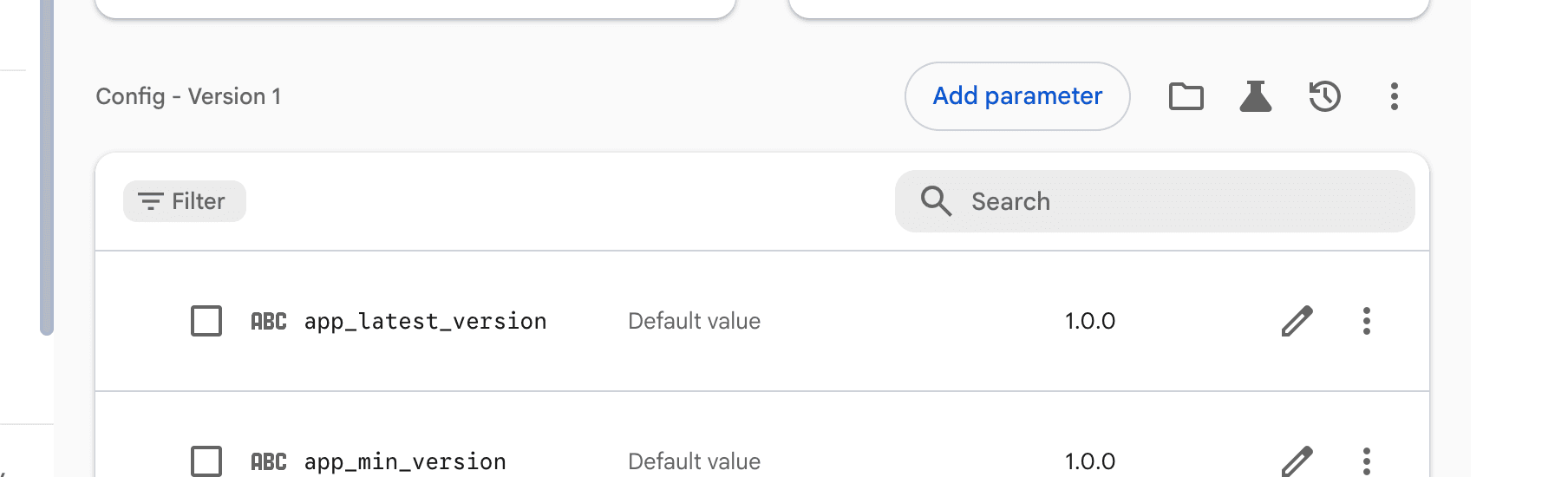
Firebase Remote Config: both parameters published An incorrect
app_min_versionlocks out every user. Bump this value carefully. -
Publish the version to the store, then bump
app_latest_versionafterward. The right flow is: publish to the store → go into Firebase Remote Config → bumpapp_latest_version(see why this is manual on purpose in Information).CLI shortcut, no need to open the console:
# Interactive: suggests the version from pubspec, asks whether it's optional or mandatory
kasy release-version

# Direct
kasy release-version -v 1.4.0

# Mandatory, no prompts (good for CI)
kasy release-version -v 1.4.0 -f --yes
Via MCP: ask "mark version 1.4.0 as live in the stores" (
set_release_version). For a blocking update, say it is mandatory (force). See Kasy MCP.The command reuses your
firebase login, reads the project fromgoogle-services.json, and only updates the version keys, without overwriting the rest of Remote Config.
What's new
-
Update the version in
pubspec.yaml(or usekasy ios release, which does it automatically):version: 1.2.0+5 -
Update the copy in
lib/i18n/pt.i18n.jsonandlib/i18n/en.i18n.json:"update_bottom_sheet": { "title": "What's new?", "highlights": [ "- New feature X added.", "- Performance improvements to the AI assistant.", "- Fixed a bug in social login." ] } -
Regenerate the i18n files:
dart run slangDone. On the user's next update, the sheet shows up automatically.
Tracking is local (SharedPreferences). If the user installs on a new phone where the version is already the latest, the sheet doesn't show up: correct, since there was no update on that device.
Information
Why it's manual on purpose
The store takes time to approve. You might want a gradual rollout, or to only announce the update as optional after a few days. If the number were set automatically, you'd be telling people to "update" before the version was even available.
"Update" button
Takes the user straight to the store. On Android it works automatically. On iOS it needs the App Store ID: run kasy configure and fill in the App Store ID (numeric) field.
When "What's new" shows up
| Situation | Does it show up? |
|---|---|
| First install (app never opened) | No, just records the current version |
| Reinstall without a version change | No |
| App updated to a new version | Yes, on the first open |
| Recently signed-up user (account created today) | No, avoids showing up right at sign-up |
Last updated on 08/23/2026