

Ads (AdMob)
Banner, interstitial, and rewarded across all 4 formats. Zero config to test in debug.
Google AdMob ads in all 4 formats, across the 3 backends. Native only (iOS/Android). On the web, every ad call becomes a silent no-op: the same code runs on any platform without breaking.
| Format | How to use it | Do premium users see it? |
|---|---|---|
| Banner | KasyAdBanner() (widget) | No, disappears for subscribers |
| Interstitial | showInterstitial() | No, disappears for subscribers |
| Rewarded | showRewarded() | Yes, the user opts in |
| Rewarded interstitial | showRewardedInterstitial() | Yes, the user opts in |
An active subscriber doesn't see banner or interstitial ads. Rewarded ones stay because the user chooses to watch to earn something.
Implementation
Via MCP: ask your assistant "add ads to my project". It runs add_feature for you. See Kasy MCP.
The ads module already ships enabled in kasy new's Quick Mode, and works in debug with test ads with no configuration at all (see Information). These steps are for going to production with real IDs.
-
On an existing project, confirm the module is on:
kasy add ads # adds it (optionally asks for the IDs) kasy remove ads # removes it kasy add --list # shows what's on -
Create the account and app in AdMob:
- Go to admob.google.com
- Create your account → Add App → select iOS or Android
- Copy the App ID (e.g.,
ca-app-pub-XXXXXX~YYYYYYY) - Create ad units for each format → copy the Ad Unit IDs
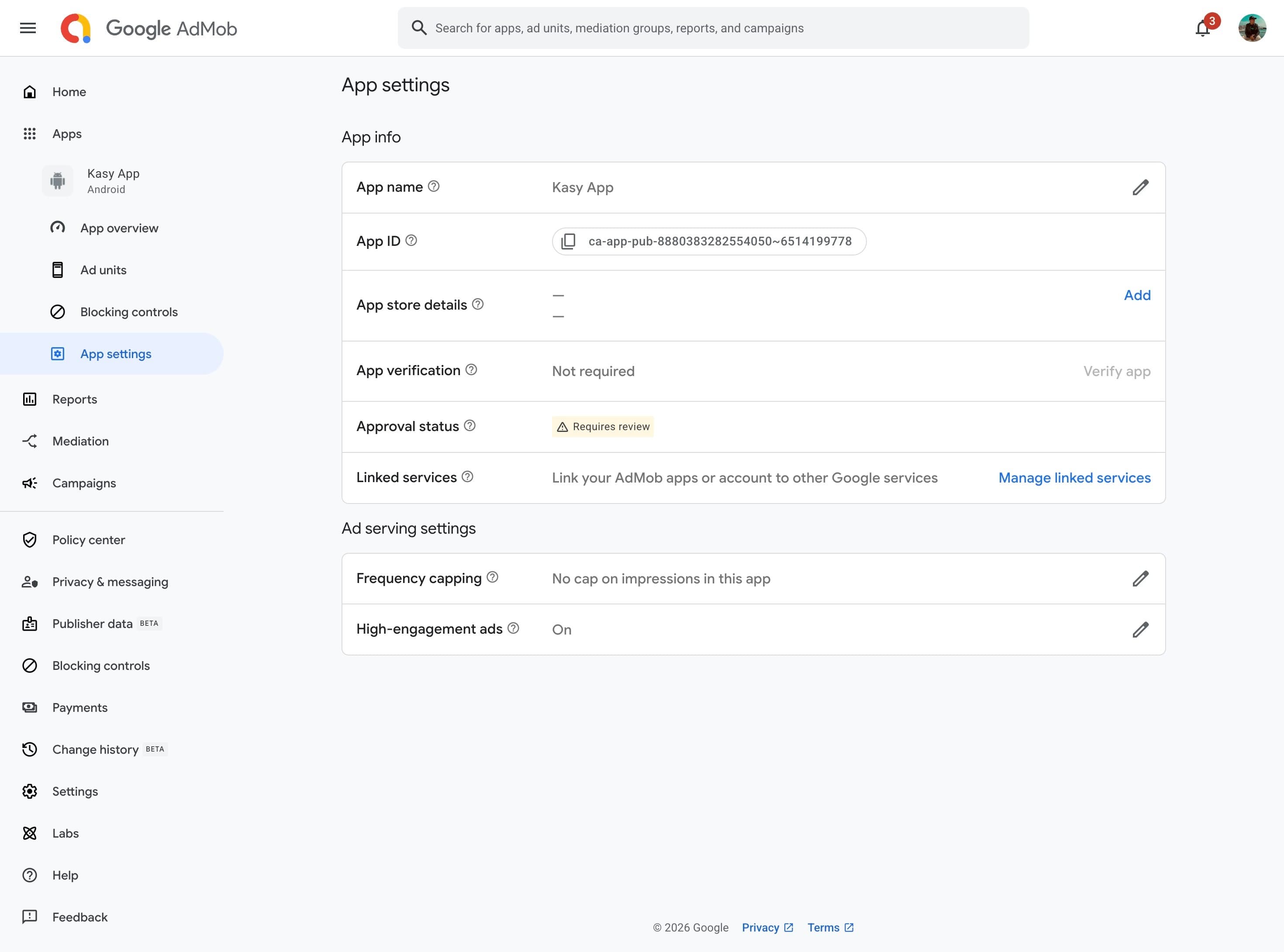
AdMob Console: App settings → App ID, the value you paste into kasy configure -
Configure it in the project:
kasy configureThe command opens the AdMob console in the browser and asks for:
- App IDs (per platform) → written into
Info.plistandstrings.xml - Ad Unit IDs (8 values: 4 formats × 2 platforms) → written into the
.env
Via MCP: once you have the IDs, paste them in the chat and ask "set up the AdMob IDs". The assistant runs
configure_project_keysfor you. See Kasy MCP. - App IDs (per platform) → written into
-
For rewarded formats (rewarded and rewarded interstitial), set up server-side verification (SSV). Banner and interstitial don't need it.
The kit already has the endpoints ready on all 3 backends:
Backend Endpoint Firebase ads-verifyAdReward(Cloud Function)Supabase verify-ad-reward(Edge Function)API (your server) GET /ads/verify-reward- Deploy the endpoint (
kasy deployon Firebase, via MCP:deploy_backend;supabase functions deployon Supabase) - Copy the endpoint URL
- AdMob Console → your app → each rewarded ad unit → SSV → paste the URL
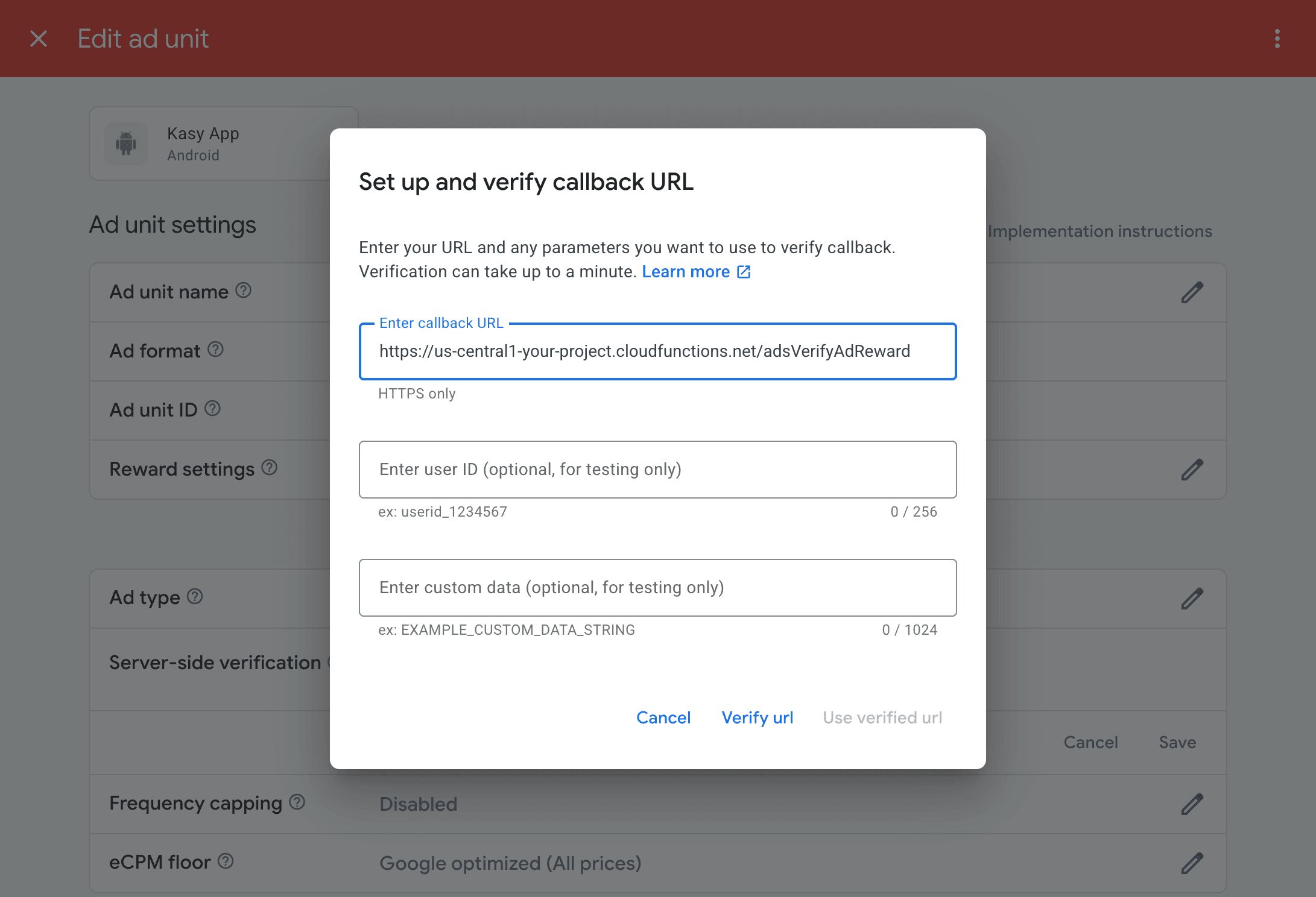
AdMob Console: rewarded ad unit → Advanced settings → Server-side verification → callback URL - Deploy the endpoint (
-
Generate the release build:
kasy ios release       # iOS
flutter build appbundle --release --dart-define=ENV=prod   # Android
Via MCP: "publish iOS" (
release_ios).
Information
Test right now (debug, zero config)
In kasy run, every format shows Google test ads automatically. Tap away, no risk, no need for an AdMob account.
| Situation | What shows up |
|---|---|
Debug (kasy run) | Test ad (automatic, safe to tap) |
| Release without real IDs | Nothing (hidden, no policy risk) |
| Release with real IDs | Real ad |
Using it in code
Banner
One line, anywhere you want:
const KasyAdBanner()For the medium rectangle:
const KasyAdBanner(size: KasyAdBannerSize.mediumRectangle)Interstitial
final ads = ref.read(googleAdsProvider.notifier);

// Show with a cooldown (default 50s between displays):
await ads.showInterstitialIfElapsed();

// Force it with no cooldown:
await ads.showInterstitial();
Rewarded and Rewarded interstitial
The user watches the ad and earns a reward. The reward is verified server-side (SSV): never credit based only on the client callback.
await ads.showRewarded(
  onReward: (reward) {
    // Optimistic UI only. The real credit comes from the server (SSV).
  },
);

await ads.showRewardedInterstitial(onReward: (reward) { /* … */ });
The 8 .env variables
Leave them blank to use test ads in debug (nothing in release):
ADMOB_ANDROID_BANNER=
ADMOB_IOS_BANNER=
ADMOB_ANDROID_INTERSTITIAL=
ADMOB_IOS_INTERSTITIAL=
ADMOB_ANDROID_REWARDED=
ADMOB_IOS_REWARDED=
ADMOB_ANDROID_REWARDED_INTERSTITIAL=
ADMOB_IOS_REWARDED_INTERSTITIAL=
The App IDs (ADMOB_ANDROID_APP_ID / ADMOB_IOS_APP_ID) don't go in the .env: kasy configure writes them straight into native code.
Demo in Admin
To see all 4 formats working in any build (even release):
- Open the Admin console (tap the version number twice in Settings)
- Go to Debugging → Ads demo
The demo always uses test ads, even in production with real IDs configured. This is intentional: clicking your own real ad counts as "invalid activity" in AdMob and can get your account banned.
Last updated on 08/23/2026